Settings
Settings give you technical control over how specs are created — the same settings surface drives both the Figma plugin and the CLI, so a component produces the same structured output no matter which one generates it.
The plugin’s Settings tab exposes the same options as the CLI’s config file, right next to the canvas where you’re generating specs.
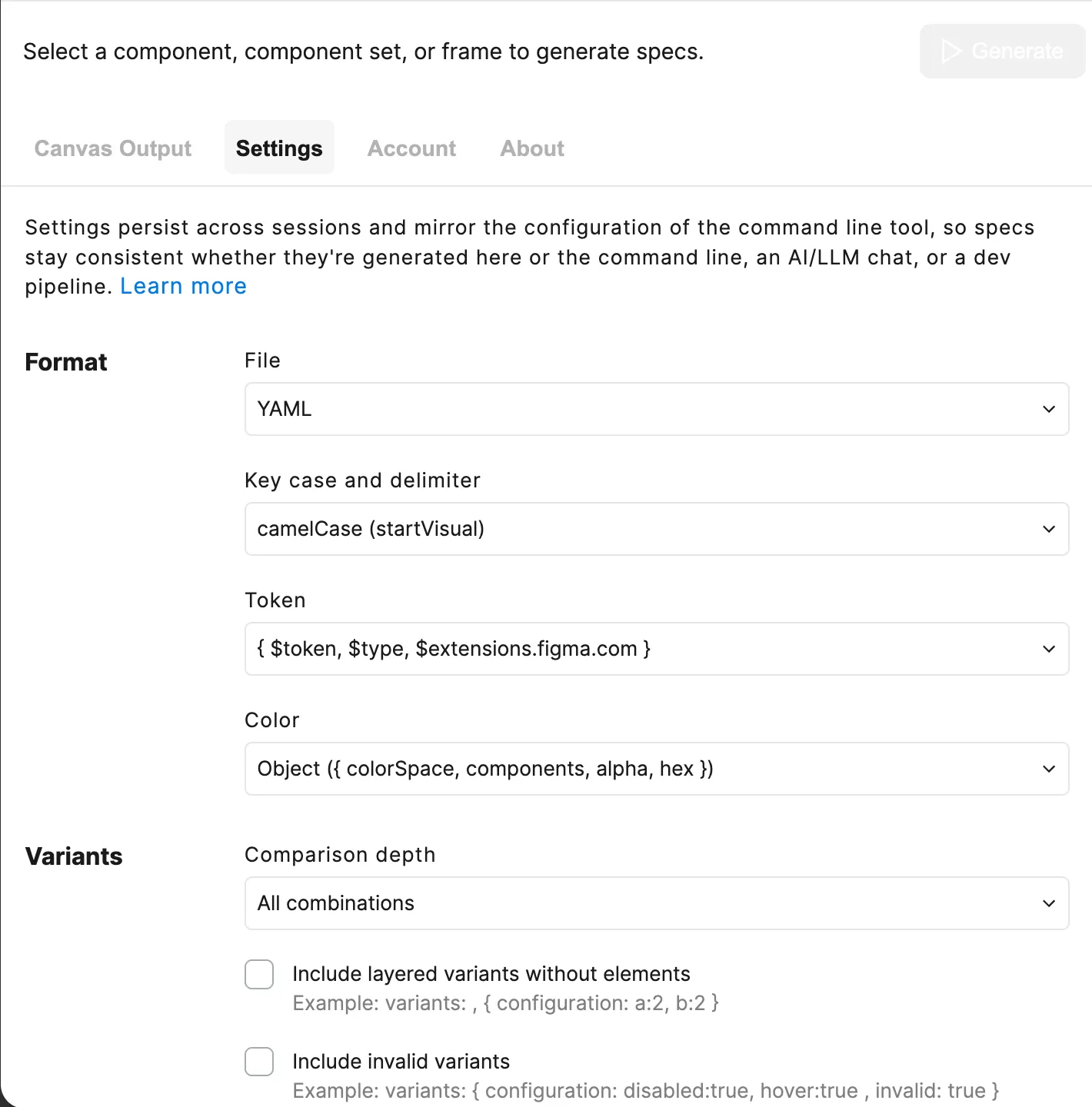
Format
The Format section controls how spec data is serialized once it’s extracted:
- Output Format — Serializes specs as
YAMLorJSON - Keys — Renames keys, such as
camelCaseorsnake_case - Tokens — Serializes as forms such as a name string or
{ $token, $type }object - Color — Formats color, such as
#FF6600or{ colorSpace, components }
Variants
The Variants section controls how variant property combinations are compared and included:
- Variant Depth — Compares depths such as
1prop at a time or9999(all combos) - Empty Variants — Includes variants like
{ a:2, b:2 }with no overrides - Invalid Variants — Includes invalid combos, e.g.
disabled:true, hover:true - Invalid Combinations — Summarizes as
invalidPropConfigurations: { disabled:true }
Elements
The Elements section controls which layers are detected as special-purpose content:
- Glyph Name Pattern — Matches names like
DS Icon Glyph / check - Subcomponents — Matches names like
Card / _ / HeaderwithinNESTEDorPAGE - Collapse Primitive Wrapper — Collapses a wrapper around a lone
textorglyphchild - Default Slot Content — Emits authored defaults as
slotContentExamples - Instance Examples — Detects frames like
{C} ExampleasinstanceExamples
Props
The Props section controls how code-only and inferred props are detected:
- Code-Only Props Pattern — Detects a layer like
Code only props - Slot Constraints — Merges
anyOf,minChildren,maxChildreninto the slot prop - Infer Number Props — Emits
minRows: 2asNumberPropinstead ofStringProp
Layout
The Layout section controls how element hierarchy is represented:
- Layout — Nests such as
layout:or flattens aselements: { parent, children }
The CLI reads settings from specs.config.yaml, layered with command-line flags and convention-based fallbacks, so a project’s output stays consistent across every specs invocation.
Priority System
The CLI applies settings using three priority levels:
- CLI flags (highest) - Explicit overrides for individual commands
- Config file - Project defaults via
specs.config.yaml - Fallbacks (lowest) - Convention-based defaults when no sources are configured
CLI Flags
CLI flags always override settings from the config file:
# Config has format.output: JSON# Flag overrides to YAMLspecs generate data/library.file.json -c Button --format yamlAvailable flag overrides:
--format→ overridesconfig.format.output--variables→ overrides the variables file path for that run--styles→ overrides the styles file path for that run
Config File
Settings from specs.config.yaml apply when no CLI flag is provided. Use --config to point at a project-specific file instead of the default location:
specs generate data/library.file.json \ -c "Button" \ --config ./configs/mobile.config.yaml \ -o specs/mobile/button.yamlFallbacks
Convention-based defaults when no sources are configured and no flags are provided:
project/├── specs.config.yaml # Config (if exists)├── data/│ ├── library.file.json # Main file (specified in command)│ └── foundations/ # Auto-discovery directory│ ├── variables.json # Auto-discovered│ └── styles.json # Auto-discoveredSettings File
Location
The CLI looks for a settings file in these locations (in order):
./specs.config.yaml(current directory)./specs.config.json(current directory)~/.specs/config.yaml(user home directory)- Custom path via
--config <path>flag
Format
The settings file can be written in YAML or JSON:
# Where `specs fetch` writes payloads, and where `generate` loads them fromdataDirectory: ./data
# Default location for generated spec files (can override with -o flag)outputDirectory: ./specs
# Figma file keys and which payloads to fetch/loadsources:  library:    key: REPLACE_WITH_LIBRARY_FILE_KEY    data: ['file','variables','styles']  foundations:    key: REPLACE_WITH_FOUNDATIONS_FILE_KEY    data: ['variables','styles']
# Processing and output settings (shared with the Figma plugin)config:  format:    output: YAML    keys: SAFE    layout: LAYOUT    tokens: TOKEN
  processing:    subcomponents:      match:        - '{C} / _ / {S}'    variantDepth: 2    details: LAYERED
  include:    invalidVariants: false    invalidCombinations: true
Validation
The CLI validates every setting value and provides helpful error messages:
$ specs generate data/library.file.json -c ButtonWarning: Invalid format.keys: 'invalid'. Using default: SAFE.Valid values: SAFE, CAMEL, SNAKE, KEBAB, PASCAL, TRAINInvalid values fall back to defaults with warnings, so builds continue.
Best Practices
1. Version Control Your Settings File
Commit specs.config.yaml to share settings across the team:
git add specs.config.yamlgit commit -m "Add Specs CLI configuration"2. Environment-Specific Settings Files
Use a different settings file for each environment:
project/├── specs.config.yaml # Default (development)├── .specs.production.yaml # Production└── .specs.staging.yaml # Staging# Development (uses default)specs generate data/library.file.json -c Button
# Productionspecs generate data/library.file.json -c Button --config .specs.production.yaml3. Document Custom Patterns
Add comments to explain project-specific settings:
config:  processing:    # Match direct children and underscore-nested subcomponents    subcomponents:      match:        - '{C} / {S}'        - '{C} / _ / {S}'      exclude:        - '{C} / Examples / {S}'
    # Only 2 levels: size + variant (not size + variant + state)    variantDepth: 2
4. Consistent Key Format
Choose one key format and stick with it:
config: format: keys: CAMEL # All keys in camelCase for consistencySee Also
- CLI Overview - CLI command options
- Getting Started - Installation and setup